
Rating:

Why Choose Video Editor for Mac
Wondershare Video Editor for Mac is easy-to-use yet power-packed Mac video editing software that lets you effortlessly edit videos to look amazing! It’s easy, utilizing classic editing functions like trim, crop, rotate, and professional extras like stylish title screens, colorful filter effects, transition/motion effects. Also, now take your video even further with special features like intro/credit screens, tilt shift effects, mosaic blur effects, face off and more. When your masterpiece is complete, export it to one of an array of common standard and HD video formats, as well as optimized formats to fit mobile devices. Need to share now? Make them web-ready to upload to YouTube and other sites. What’s more, you can even burn DVD! Get this one-of-a-kind video tool today!
Import & Edit Virtually any Format Video, Audio or Photo
- • Video: Most major standard and HD formats, including FLV, MOV, AVI, MKV, FLV, WMV, TS, MTS—and many more.
- • Audio: MP3, WMA, WAV, M4A, AAC, AC3, OGG, etc. as background music of the videos.
- Photo: BMP, JPG, PNG, GIF, etc. and create home movies combining photos and video.
Edit and Enhance Videos and Photos to Make Magic
- • Trim, crop and rotate videos to achieve the best overall result.
- • Enhance your videos with soundtracks, voiceovers and special sound effects.

- • Now 13 cool new intros & credits to choose from and easily create professional-looking home movies.
- • Choose from 80+ professional filters to add special and artistic effects to videos and photos and instantly bring your home movies to the next level.
- • Apply from 59 transition effects to videos and photos and add photo motion effects to achieve stunning movie effects instantly.
- • Provide many special features like video & audio speed, mosaic, tilt shift, face off to make your creation more personalized and vivid.
Export Video to More Formats to Share Anywhere
- • Save videos to play later in formats like MOV, MP4, M4V, MKV, WMV, FLV, etc.
- • Output optimized videos for playback on portable devices like iPhone 4S, iPhone 5, iPad 2, the new iPad, etc.
- • Directly upload videos to YouTube to share your video creations. You can also send messages to your Twitter and Facebook account at the same time.
- • Burn the edited videos and photos to DVD discs with high quality and fast burning speed or save as .dvdmedia, DVD folder or ISO image files to burn later.
Talk From Users
Personalized My Video
Installing Vivideo for Mac might seem silly to folks who get a lot of use out of iMovie, but what I really appreciate about Vivideo is that, when I've personalized my video and it's time to share it, I have some many more options: tons of devices, formats--even flash video!
Cool Editing Features.
This is the best and easiest video editing tool I ever used, I can do a lot of amazing effects just like the professional editing software like FCP but just with a few simply clicks. That's really awesome. It would keep in my Mac Pro.
Cost Effective and Easy to Use
That's a totally cost effective final cut pro alternative for people like me, I could handle with magnificent videos with this video editor.
Very Professional for Home Using
For home video edition this is absolutely easy and simple. Very professional home video editor and meet all needs. Editing speed is fast.
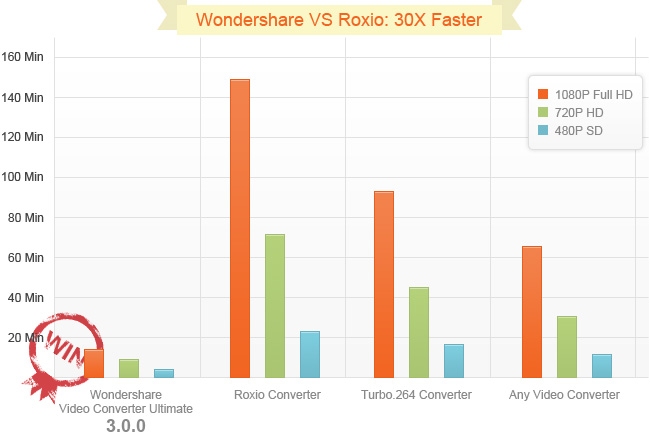
Featuring Wondershare’s industry leading APEXTRANS™ technology, this program can convert videos 30X faster with zero quality loss. The graph below gives you an idea of the speed advantage Wondershare Video Converter Ultimate has over other major video converters on the market.
Video source length: 30minutes; Size: 1080p, 720p and 480p.
In lossless conversion mode, Wondershare Video Converter Ultimate supports the following formats:
Lossless conversion - Supported Input File Formats
M2TS, MTS, MKV, FLV, TS, MP4, MOV, AVI, M4V (without DRM)
(Note: All formats must be with H.264 encoded and Frame Rate less than 30 FPS.)
Lossless conversion - Supported Output File Formats
MOV, M4V (without DRM), MP4, MKV
Lossless conversion - Supported Output Devices
iPhone 4, iPhone 4S, iPhone 5, iPad, iPad 2, iPad 3, iPad mini, Apple TV , Apple TV 2, Apple TV 3, Apple Generic



 Secure Download
 Up to 30 Day Money Back Guarantee